
Cisco NX-OS
Cisco's NX-OS is a Linux-based network switch operating system. Because it is a Linux system that provides direct shell access over SSH with sudo permissions, Sandfly is able to scan it.
Setup
User Setup
Sandfly requires a user who logs in directly to the shell and is able to use sudo to elevate privileges. NX-OS natively supports this with the user role set to network-admin (this puts the user in a group with sudo permission) and shelltype set to bash (the user logs in to the shell instead of the Cisco CLI).
Create a sandfly user from configuration mode:
nxos(config)# username sandfly password EnterSecurePasswordHere1234 role network-admin
nxos(config)# username sandfly shelltype bash
user sandfly exists
Sandfly strongly recommends SSH keys for authentication to minimize the risk of attackers stealing credentials:
nxos(config)# username sandfly sshkey ssh-ed25519 AAAAC3...spnAt this point, the sandfly user can SSH to the switch, gets a shell prompt, and can use sudo.
Sandfly Setup
Add the switch to Sandfly using the normal add host process, with one important difference. By default, Sandfly Nodes are configured to use the user's home directory as the working directory for scanning. If that directory is not writable, they fall back to /dev/shm. NX-OS does not have enough disk space allocated to the home directories, and the /dev/shm directory is mounted noexec. For scanning NX-OS, we recommend using the /volatile directory as the working directory.
You may override the default working directory on a per-host basis. When adding the NX-OS host, enable the Override Scan Directory option (located on Step 3 of the Add new hosts form) and enter /volatile.
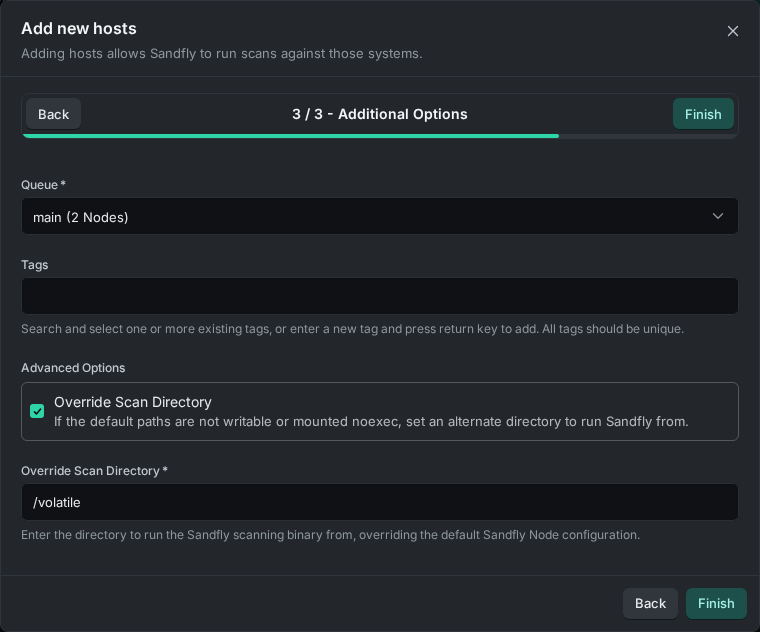
Setting the Override Scan Directory
Alternatively, if you have a dedicated Sandfly Node for connecting to your NX-OS switches, you can configure the node's default directory to /volatile. See the Default and Fallback Directories section of the Special Case Node Configurations documentation for details on how to edit the node's configuration.
Updated 3 days ago