
Schedules
The scheduler uses four distinct schedule types to determine host protection behaviors. To access this section, choose Schedules from the sidebar menu.
User Created
These types of schedules are created through one of the "Add" buttons on this page. Details for each form is available following this page of the documentation. There are two types of these non-system schedules:
Scan Hosts
This schedule type runs sandflies against configured hosts. Host scan scheduling on Sandfly works differently than what you may be used to. Instead of fixed times, Sandfly uses a unique random scheduling mechanism. Setting up Sandfly to use a random schedule is simple and automatic.
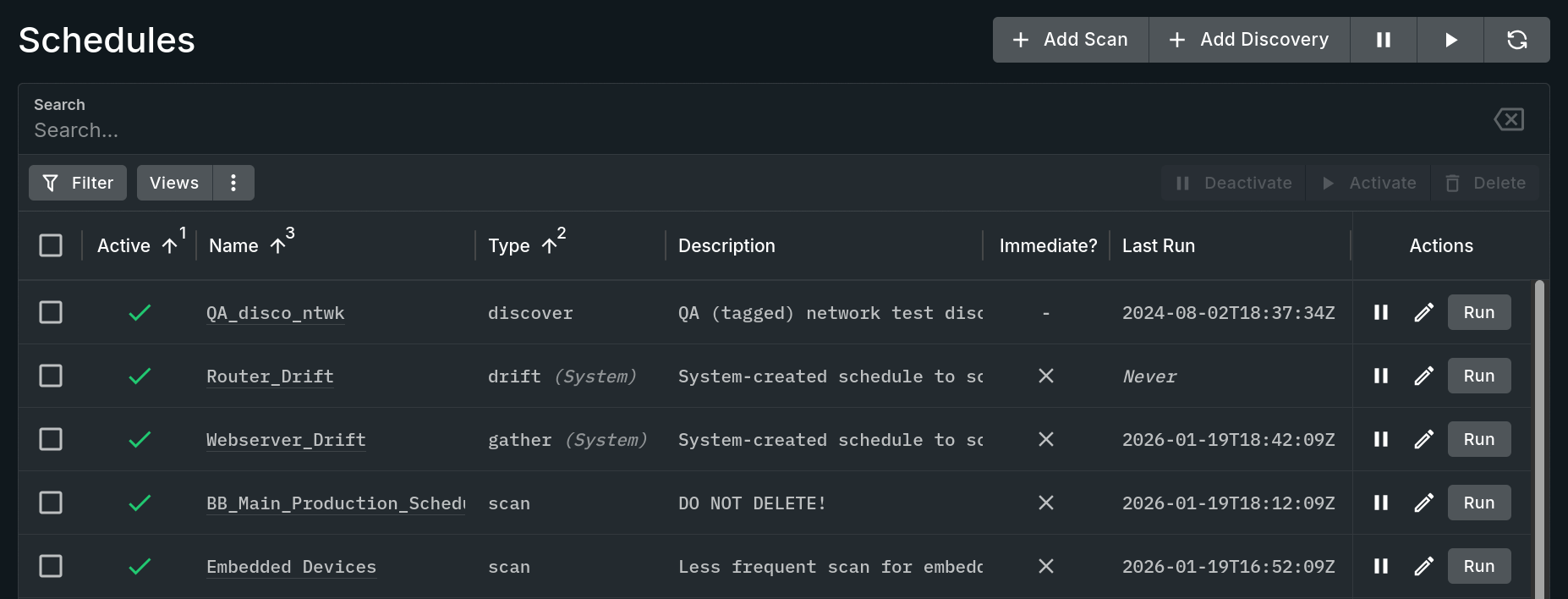
Schedules View
Random Schedule and Random Sandflies
Sandfly allows you to set up a random time window for Sandflies to run. Additionally, you select the percentage of active sandflies that will be sent out each time the schedule runs.
The idea behind this is simple. Say you pick a time between 30-60 minutes. Then you pick a random number of sandflies to run such as 20%. Sandfly will take that scan schedule and pick a random time in the future between 30-60 minutes (e.g. 39 minutes). When 39 minutes elapses, Sandfly will select 20% of the active sandflies and use them to investigate the targeted systems. Afterward, Sandfly will select a new time 30-60 minutes in the future and repeat the process with another 20% of the sandflies selected at random.
The reason Sandfly does this is three-fold:
- Reason One: Lower Impact - Random and small scheduling lowers the impact of the system because we are doing many small fast scans throughout the day instead of huge monolithic scans once a day (or less) as you may be used to.
- Reason Two: Superior Coverage - By doing many small random scans we get superior coverage for attacks. A typical schedule can easily get 100% coverage with sandflies. Instead of checking for a problem once a day, Sandfly can check for the same problem dozens of times each day. This creates a much smaller window for an attacker to remain undetected.
- Reason Three: Evasion Resistance - By being random, it increases the evasion resistance of Sandfly. Attackers can evade scheduled scans with some effort. Since Sandfly is random however, it makes evasion by a set schedule very difficult.
Discover Hosts
This schedule type searches for new hosts on your network. Host discover schedules are principally, but not exclusively, intended for use with IP addresses and / or network blocks that have hosts that may change often / dynamically for any reason, yet exist long enough to benefit from security scans. A discover type of schedule searches the targeted addresses for new or changed hosts and updates Sandfly accordingly.
Discover scans enable the following use cases:
- Automatically monitor a DHCP address pool for new Linux hosts.
- Secure address ranges and dynamic workloads at your cloud provider.
- Find new hosts that may have appeared on your network which are unauthorized.
System Created
System Schedules, i.e. schedules types containing "(System)", are created and managed through the associated Drift Profile. While some schedule independent actions (such as toggling its activation state) can affect these schedule types, they are largely governed by their parent profile. There are two types of system schedules:
Gather
This system schedule type is uniquely designed to collect results to build a Drift Profile while the profile is in the "Gather" state. Once a gather schedule reaches the end of its collection period the profile will change to "Enforce" and the schedule will be converted to a "Drift" type. This conversion can also be forced manually as needs dictate.
Drift
This system schedule type is uniquely designed to perform drift detection scans for the associated Drift Profile when the profile is in the "Enforce" state. Unlike the normal scan schedules, results that come from a drift scan will be marked as being "drift" or "whitelisted" to know that those results were affected by a profile.
Updated 7 months ago