
Viewing Credentials
You can view what credentials are configured in Sandfly by selecting Asset management > Credentials in the sidebar menu.
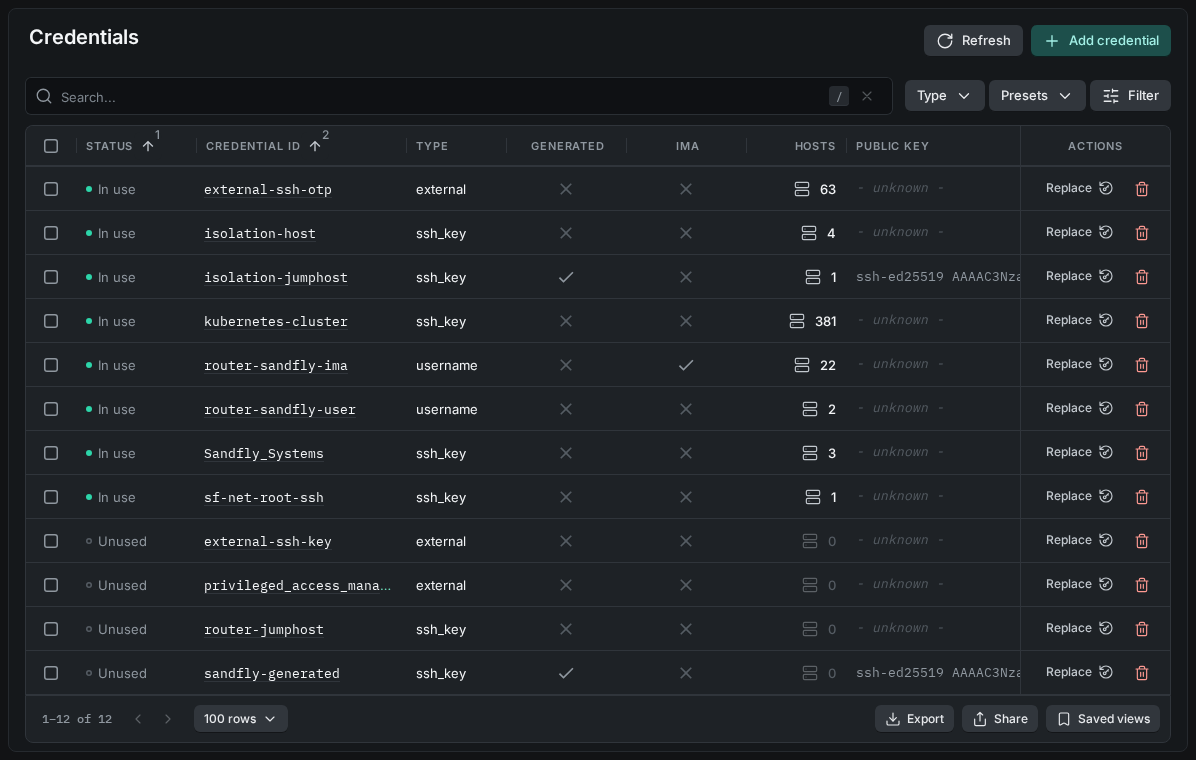
Credentials List
All credentials are encrypted, and their raw details cannot be viewed. However, you can see all the credentials that were added into the system and delete or update them as required.
The Status column shows In use when one or more hosts use the credential, and Unused when no host uses it. By default, the table lists the credentials that are in use first, in order of name.
The quantity of hosts that are using a credential is shown in the Hosts column. This is helpful for credential administration along with knowing how many hosts would be affected should it be updated or deleted. To see those hosts, click the hosts icon in the Hosts column. The Hosts page opens, filtered to the hosts that use the credential. To list only the credentials that hosts use, or only those that no host uses, click Presets in the table toolbar, and then select Only Used Keys or Only Unused Keys.
Updated 6 days ago