
AI Analysis
AI Analysis is an optional feature which allows users to send Sandfly result and/or host data to a Large Language Model (LLM)🡵 for further security analysis.
Sandfly does not enable this feature by default, and as usual we never collect or analyze any customer data if you decide to use this feature.
INFO: AI Analysis and AI TriageAI analysis is separate from AI triage. An AI analysis is started by a user and produces a conversation with the AI Security Analyst, including a severity, the evidence, and recommended actions; it does not change the severity of any detection. AI triage judges hosts and artifacts, either when requested or automatically as scans arrive, and can reclassify the severity of an artifact. AI triage has its own settings card and, by default, uses the same AI provider connection as AI analysis.
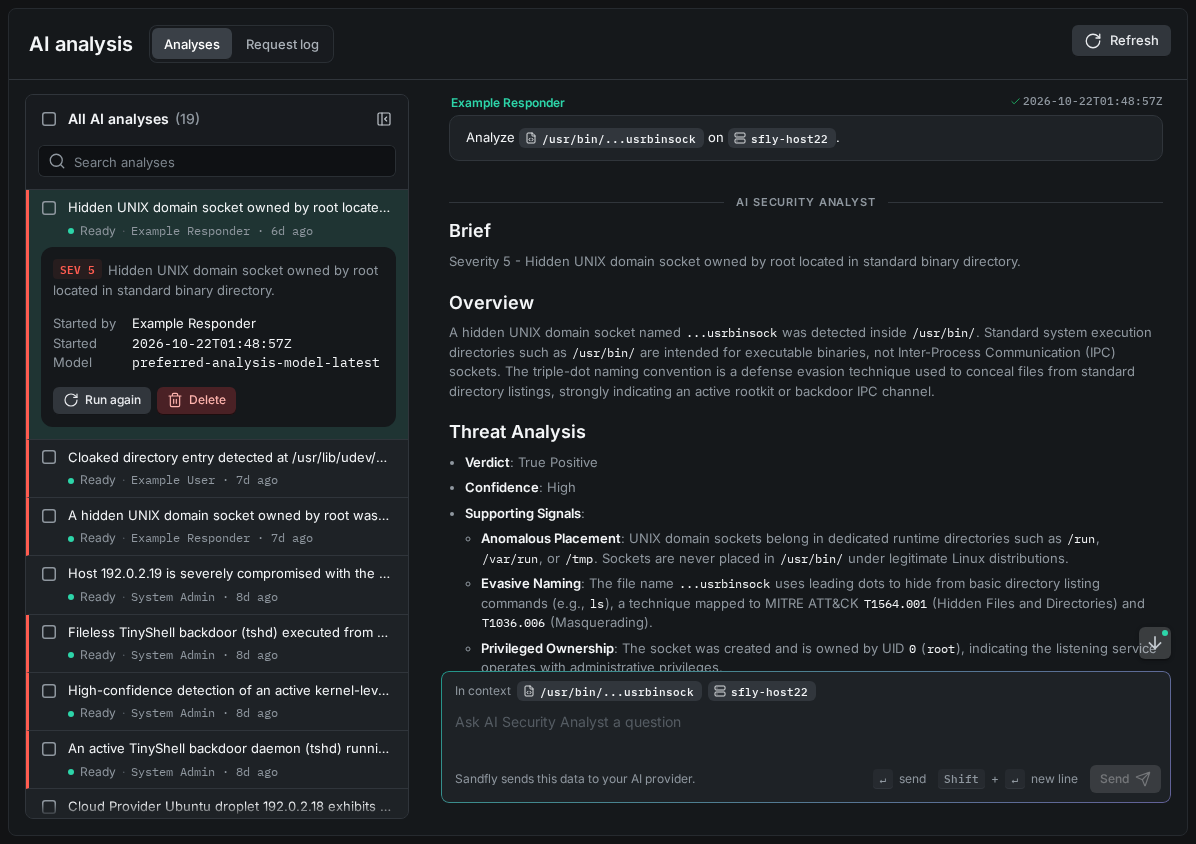
AI Analysis Workspace
Analyses open in the AI analysis workspace, which shows a list of analyses next to the conversation with the AI Security Analyst.
The User Interface (UI) marks each place where an AI feature (AI analysis or AI triage) is involved, such as a button, label, or tab, with the following icon:

AI Feature Icon
For this feature to be available to all users, a supported LLM provider must be configured and enabled in the AI analysis card of the AI Configuration settings.
Updated 13 days ago