
AI Triage
AI triage is an optional feature that asks a Large Language Model (LLM) for a verdict on a host or an artifact. A verdict says how alarming the host or artifact is, how sure the model is, and what to do about it, and it can reclassify severities so that the hosts that need attention sort first. AI triage runs automatically as scans arrive, or only when a user requests it.
INFO: AI Triage and AI Analysis Are Different FeaturesAI triage returns a structured verdict that Sandfly stores and sorts by, and it can change severities. AI analysis is a conversation with the AI Security Analyst that you start yourself; it produces a written report and does not change any severity. You can pass any triage verdict to AI analysis when you want the long form. See AI Analysis.
WARNING: Protect Private and Sensitive DataAI triage sends host data to the configured AI provider. Private and sensitive data may be exposed by doing this and is outside the control of Sandfly. An administrator can keep specific hosts out of automatic AI triage with the Exclude hosts with tags setting.
What AI Triage Judges
- A host - AI triage judges the host from its alerting artifacts and the host's context: its processes, listening sockets, users, scheduled tasks, services, and kernel modules. It returns a verdict, a confidence, a one-line brief, tags, a short report, and findings that group related artifacts, each with an assessment and a recommended action.
- An artifact - The AI classifier judges one artifact, with enough of its host to place it. It weighs the ML analysis of the binary, how many hosts have the same artifact, what the sandflies matched, and where the artifact lives and who owns it. Artifacts are classified only on request, never automatically.
The document that describes a host is built to a size target. The alerting artifacts are ranked worst first: the worst ones always carry their full detail, and lesser alerts are sent as summaries when the target is reached. When the document was shortened, the model is told what it was not shown and should lower its confidence instead of guessing. The size target is the Payload target setting.
Manual and Automatic Triage
AI triage is configured on the AI triage card of the AI settings, and an administrator chooses its mode. See AI Configuration.
- Manual - A host or an artifact is triaged only when a user requests it.
- Automatic - Sandfly also judges each host when a scan changes what is alerting on it. The Minimum interval, the Daily limit, and Exclude hosts with tags limit automatic triage. A host that has not changed is not judged again.
A request made by a user always goes to the front of the queue, and the minimum interval, the daily limit, and the tag exclusion do not hold it. Even when AI triage has no configuration of its own, a user can request a verdict through the AI analysis connection.
Verdicts
The verdicts, from least to most alarming:
| Verdict | Meaning |
|---|---|
| Clean | Nothing of concern. A host with nothing alerting is recorded as Clean without asking the model. |
| Likely false positive | The alerts fired on legitimate, expected things, such as a package manager, a monitoring agent, or an administrator's own tools. Nothing on the host needs to change. |
| Needs attention | A real weakness that should be fixed, with no sign that anyone has used it: a weak password, an insecure configuration, readable credentials. |
| Suspicious | Possible sign of intrusion. A person must look. |
| Likely malicious | The evidence points at an intrusion. |
| Likely compromised | Treat the host as compromised. |
The difference between Likely false positive and Needs attention is what to do: if the right response is to leave the host as it is, the alert is a false positive; if something on the host should be fixed, it is not, however unlikely it is to be exploited.
Each verdict has a confidence of Low, Medium, or High. A low confidence usually means that the model did not get enough evidence, for example because the document was shortened. A Low confidence verdict on a host with hundreds of alerts is a prompt for you to look, not a conclusion.
What a Verdict Changes
- The host's severity - The host's severity becomes the rating in the verdict, from 0 to 5. On the Host triage page, the host moves to the band that matches.
- The artifacts' severities - Each finding can carry a severity for its artifacts. That severity becomes the artifact's severity on this host, replacing what its sandflies gave it. This is how a routine finding stops outranking a real one. The artifact's sandflies keep their own severities on the Sandfly results tab.
- A new verdict replaces the old one - A new verdict for the host takes back what the previous one set before it applies its own.
- Stale verdicts - When what is alerting on a host changes after its verdict was formed (an alert appears, or one is whitelisted, deleted, or resolved), the verdict is marked Stale. Its words still describe the host as it was, and the host's severity goes back to its worst alerting artifact until a new verdict lands.
An artifact classification works the same way for that one artifact: its severity becomes the artifact's severity on its host, and it is shown as SEV n in front of the verdict.
Shared Verdicts
Hosts that have the identical set of alerting findings on the same distribution family are in the same situation. When one of them has a verdict, the others take it up without another submission to the AI provider, with the findings and severities applied to their own artifacts. A rollout of the same agent to two hundred hosts costs one submission, not two hundred. How many hosts have an artifact is a strong false-positive signal, so a host that brings the situation into a much larger spread of hosts is judged again, and its new verdict then replaces the earlier one on every host in the same situation.
Where AI Triage Appears
AI Triage Block
The AI triage block shows the host's verdict. It is on the Host triage summary card, on the Host Triage page and on the Summary tab of a host. Its heading shows one of these states:
| State | What it means | What you can do |
|---|---|---|
| Off | AI triage is not configured. | An administrator can turn it on in Settings. Click Open AI settings. |
| Not yet triaged | Sandfly has no verdict for this host. | Click Run AI triage. |
| Not triaged automatically | The host's tags keep it out of automatic triage. | Click Run AI triage. A request made by a user still works. |
| Queued | The host is number N of M in the triage queue, or it is held by the daily limit until the next UTC day. | Click Triage now to move it to the front. |
| Analyzing | A verdict is being formed. | Wait. The block updates by itself. |
| Complete | The verdict is shown. | Read it. Click Re-evaluate for a fresh verdict, or Pass to AI analysis for a written report and a conversation. |
| Failed | The last attempt did not complete. | Click Try again, or View request log to see the error. |
A complete verdict shows the verdict word and its confidence, the one-line brief, the tags (for example cryptominer, persistence, package-manager), and the model and time that formed it. Stale in front of the verdict means that the host's alerts changed after the verdict was formed.
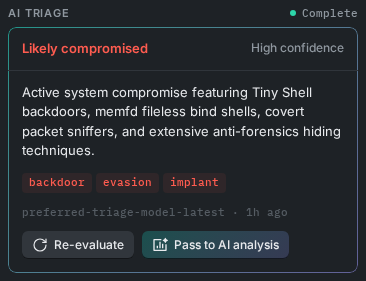
AI Triage Block in the Complete State
AI Classifier Block
The AI classifier block shows the verdict for one artifact. It is on the Artifact triage summary card, on the Triage tab of a host and on the Overview tab of the Artifact detail page.
| State | What you can do |
|---|---|
| Off | An administrator can turn on AI triage in Settings. Click Open AI settings. |
| Not yet classified | Click Run AI classifier. |
| Queued or Analyzing | Wait. A request made by a user is worked before automatic host triage. |
| Complete | Read the verdict, confidence, brief, and tags. Click Re-evaluate artifact for a fresh verdict, or Pass to AI analysis for a written report and a conversation. |
| Failed | Click Try again, or View request log. |
Other Places
- Host triage page - The Finding column leads with the verdict, or with the triage status (for example Triage queued, Daily limit, or Triage excluded). Each band header and the bulk actions have AI triage, which requests verdicts for the hosts shown or selected. See Host Triage.
- Triage tab of a host - The Finding column leads with the AI classifier's verdict for an artifact.
- Task queues page - The AI triage view lists the hosts and artifacts that wait for, or are getting, a verdict. See Task Queues.
- AI analysis log - The Request log tab of Logs > AI analysis lists every request sent to the AI provider, including AI triage requests.
For how to use the verdicts when you triage hosts and artifacts, see the Triage Workflow.
Updated 4 days ago