
Result Response Actions
Result-based response actions require the Responder role; only then are the actions displayed under the Respond menu button, which is found on the Sandfly Result details panel.
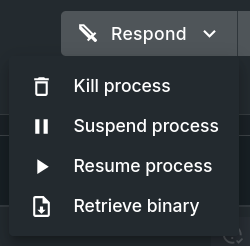
Process Result Respond Menu Button with Options
Response Actions
Available response options are relative to conditions of the result, which are detailed below. Not every result will have an action available.
Every requested action, the result of the action, and anything retrieved will be recorded in the Response Action Log. A successfully retrieved file, be it a process binary or an on-disk file, can be downloaded from there.
Process Related
Process response actions allow responders to kill, suspend, resume, or retrieve the binary of a process on a host. These actions are only available for sandflies that use the process engine and contain a hash of the binary in the result data.
Before any process-associated action is carried out on the host, Sandfly verifies the target process by comparing its binary hash against the hash recorded in the original result, ensuring the correct process is acted upon. If the process is no longer running or the hash does not match, the action is not executed and its status is logged as a failure.
File Related
File response actions allow responders to retrieve a copy of a file off the host from a corresponding result. These actions are only available from sandflies that use the file, cron, at_jobs, or kmodules engine and contain a path to the target file within the result data.
Unlike process actions, file retrieval does not perform hash verification, as files may change between detection and retrieval.
Updated 4 months ago