
Drift Wizard - Drift Sandflies
This wizard step involves selecting the strictness of matching and which specific sandflies to use to detect drift on the model hosts.
If the Whitelist Only option was selected on the previous step, this step will be skipped.
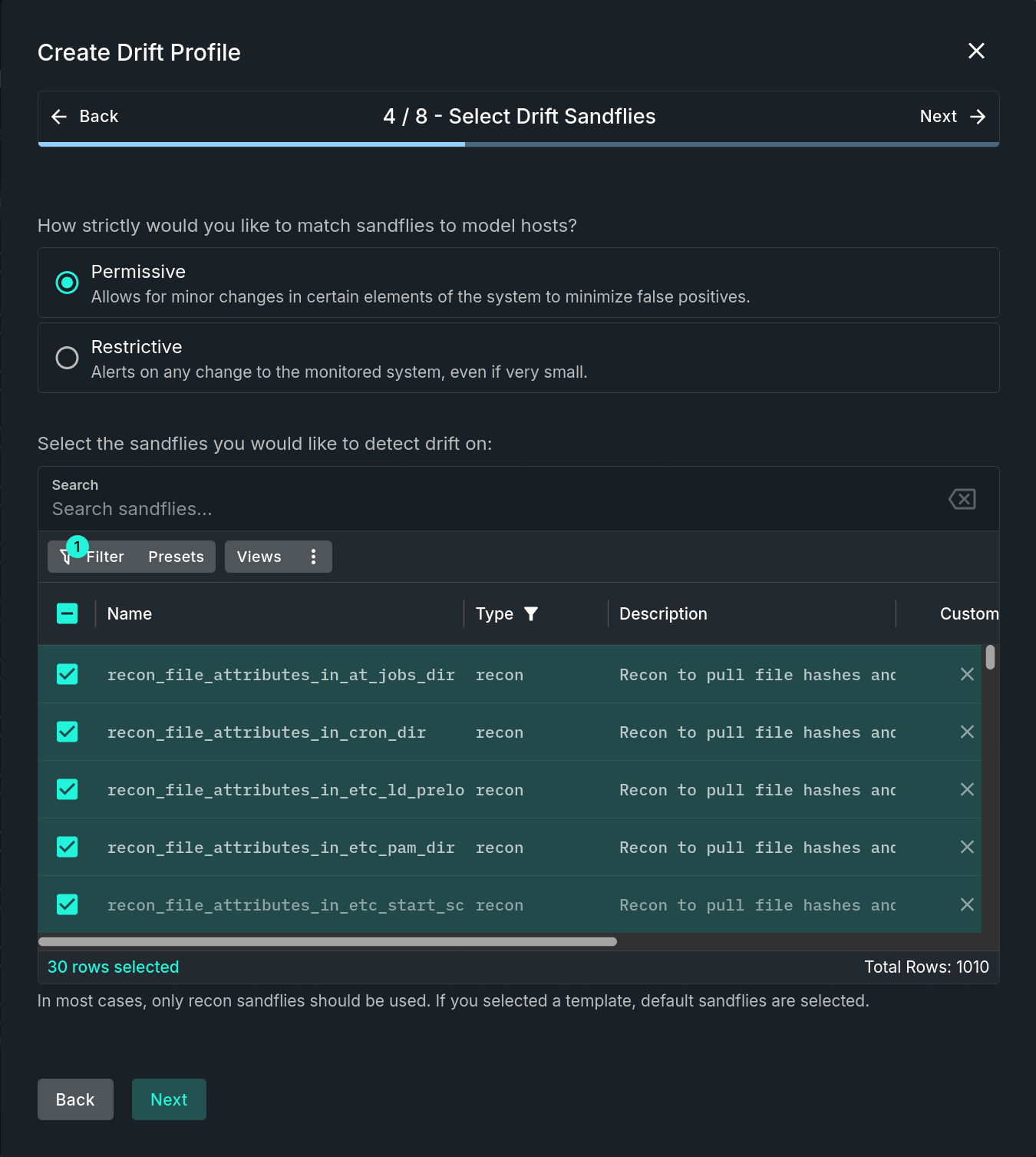
Select Drift Sandflies Step
NOTE: Appearance of this Step is Dependent on the ConfigurationThis entire step will only be included in the wizard if you did not choose "Whitelist Only" on the previous step. Use the form's "Back" button if you need to change to a drift template instead of whitelist only.
Step Sections
Match Strictness
This section is for determining how strict to match sandflies to model hosts. Options include:
- Permissive - Allows for minor changes in certain elements of the system to minimize false positives.
- Restrictive - Alerts on any change to the monitored system, even if very small.
Sandfly Selection
At least one sandfly must be selected. In most cases, only recon sandflies should be used. If creating the profile for whitelisting (either whitelisting alone, or in addition to drift detection), do not select sandflies for whitelisting here. All alerts on the model hosts, regardless of sandfly, will be included for whitelisting in the profile. This selection is only for sandflies that you want to use for drift detection.
If a template was selected on the previous step, default sandflies are preselected. However, that list can be further modified by adding and/or removing sandflies as desired.
Updated 9 months ago